Grab My Blinkie

I design for...


About Me

- Alika
- I am Angela aka Alika. PSPing for 8 years, have been making kits for a lil over a year. I have two children. 1 daughter who is 3 and 1 son who is 20 months. You may use my scrap kits in your tutorials or challenges but please link them back to me. Thanks! I would love to see your creations with my kits please email them to alikasscraps@hotmail.com and I will add them to my blog!
Showing posts with label Pinuptoons. Show all posts
Showing posts with label Pinuptoons. Show all posts

 Posted by
Alika
Posted by
Alika
 Labels:
Saturday, November 5, 2011
 Sweet Decadence Tag Showoff - FTU

Hey my smexies! I made this sweet tag for a contest in one of my forums and I wanted to show it off! :)
Artwork used is Pinuptoons which you can purchase HERE
Scrapkit: FTU by PolkaDot Scraps called Eternal Love get it HERE
Font is called Beautiful every time
Plugins used: Eyecandy 4000 glass and gradient glow, Xero Fritillary

Tuesday, September 13, 2011
Everyday Moments Mini Tut FTU!

Made this siggy for another showdown over at Siggy Showdown come join us HERE
What you need:
Beautiful art of Pinuptoons which you can purchase HERE you must have a license and purchase their art in order to use them in any images/creations!
Scrapkit: Saving This Moment by Jaelop Designs, leave some luv! Its a freebie! Grab it HERE
Mask: I am not sure where the mask I used came from it has no copyright layer or no naming convention I am sorry :( Any mask will do! If you know where this mask came from please email me so I can give full credit to the creator! Thanks (its a oldie I had lol)
Mask: I am not sure where the mask I used came from it has no copyright layer or no naming convention I am sorry :( Any mask will do! If you know where this mask came from please email me so I can give full credit to the creator! Thanks (its a oldie I had lol)
Font: Miss Lee Gatees
Friday, September 9, 2011
Starific Art PTU Tutorial
FAIR WARNING - This tutorial was written to give some humour, fun and awesomeness to the tutorial world. I am being a lil off the wall and hyper with this so IF you are offended easily, I probably would skip this tut O.O

This tutorial is for those that have a working knowledge of Paint Shop Pro.
What you need:
The beautiful artwork of Pinuptoons is what I am using in this tag, you must have a license in order to purchase and use this image you may grab it and some more of their other images HERE
This beautiful and versitile scrapkit by Mystical Illusionz Scraps called Anonyamous, It is a PTU kit and you can get it here
Effects: Drop Shadow
Filters: Eye Candy 4000 - Gradient Glow
Font: Pot Roaster (What a odd yet funny name!)
Dont forget the Mojo Fairy! And when your done, turn her over to me...or else!!!!!!
Ok, now that we have that normal, repetitive shiznet done we can start! Yesssssssssss, excited? I am! So you better get excited to or I’ll have to come spank ya for being naughty!
Open up New Canvas 600x600...bet ya already new that smexy biatch didnt ya?!?!
Copy and paste ele46, resize by 75% Woot looking good already :D (I love this frame!)
Use magic wand for selection tool, click in both of the frames, selections mody expand by 3. STOP I didnt say 4...nooooooo not 2...3...THREE whats distracting ya this time?!?! OOO icecream huh...good idea, brb in 10!
.....
...
..
.
YUM that was tasty! How about you? :P Lets continue now shall we before you get distracted again!
Paste pp4 as new layer, resize by 75%, invert, edit, clear and drag down below frame layer
Paste ele52 as new layer and place down at bottom of two frames, drag layer below the frame and paper layer.
Paste ele50 and repeat like above (resize to 65% though), make sure ele50 is above the green splatter too.
Merge the two layers, duplicate and go to image, flip. How awesome is that! Like totally Im telling ya this is gonna be another one of your new rocking awesome tags that you can say I learned how to do it from Alika, Tutorial Extraordinaire!
Paste your tube, place how you wish on the tag, duplicate and change layer properties to soft light. Dont get all crazy here either and start duplicating and adding more properties and effects and filters and ending up with one Alien looking tube! Ok, Step awayyyyyyyyyyyyy from the PSP before you do it..I know your tempted but....dont...Alien tubes are NOT fucking smexy!
Add whichever elements to the tag that you like. This kit has a lot of different kinds so play it up a bit OR follow me if you wish with the ones I used and placements.
Go ahead and add your copyright now. Make sure you have the right artists too, dont want to have to go back and redo all over again now do we!
For the font I am using Pot Roaster (awesome name!) size 72, with colors #4871ff and #86c820. Apply a gradient glow with the settings below: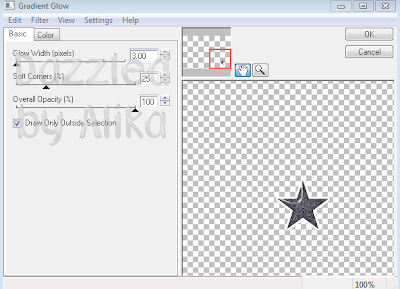
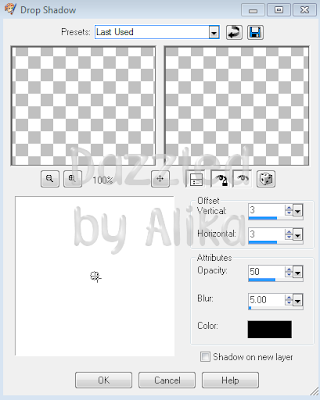
Now go back through each layer, add the following dropshadow settings to everything because that’s what makes a fucking awesome tag ya know! Wooohoo:
Save that biatch (without the name) as a .png and a .psd incase of any changes and so you can slap all your new totally awesome friends names on it! That’s it for now meh sexy biatches have a wonderful day and don’t get into to much trouble! Me…………well, Im off to be naughty buwhahahahha!

Save that biatch (without the name) as a .png and a .psd incase of any changes and so you can slap all your new totally awesome friends names on it! That’s it for now meh sexy biatches have a wonderful day and don’t get into to much trouble! Me…………well, Im off to be naughty buwhahahahha!
Tuesday, July 26, 2011
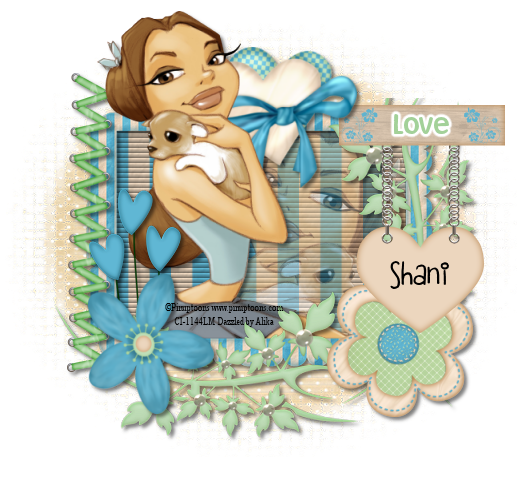
Puppy Love Mini Tut-FTU
Artwork: Pinuptoons you can purchase HERE you must have a license and purchase this art in order to use it.
Scrapkit: Flutterby FTU by Wicked Princess Scraps you can get it HERE ty hun
Scrapkit: Flutterby FTU by Wicked Princess Scraps you can get it HERE ty hun
Mask: Mask #5 which you can find here thank you Deviant Designer
Effects: blinds on background paper of frame
Layer Properties: normal, Opacity 40 on tube layer underneath the frame.
Font used: Disney Simple and FBlipgloss

Effects: blinds on background paper of frame
Layer Properties: normal, Opacity 40 on tube layer underneath the frame.
Font used: Disney Simple and FBlipgloss
Saturday, December 5, 2009
Pinuptoons Naughty
Click on Image to get to tutorial. Thanks for looking! I would love to see what you have created just email alikasscraps@hotmail.com and I will upload your creation to my blog!

Subscribe to:
Comments (Atom)
Stay Away

My Hideouts :O


